Introduction
This page explains how to account for interest accrued but not taxed on a fund that is in it's first year on Class. The process highlighted below will allow you to successfully account for accounting income and taxable income in the year the income was received.
Scenario
Apple Accountants were using a generic admin software before they made the decision to switch to Class Super to administer the SMSFs for the 2014 financial year.
One of the funds transitioned onto Class as at 30/06/2013 had an interest receivable amount on the Statement of Financial Position. This is what we know of the term deposit the amount related to:
Date Purchased |
21/04/2013 |
Deposit Amount |
$500,000 |
Investment Term |
90 days |
Interest Rate |
3.40 % p.a. |
Interest Paid |
At Maturity |
Associated journal entries:
2012-13
| Date | Description | Debit | Credit |
|---|---|---|---|
| 30/06/2013 | Dr Interest Receivable | $3,260.27 | |
| Cr Interest Income | $3,260.27 |
2013-14 (to be posted in Class)
| Date | Description | Debit | Credit |
|---|---|---|---|
| 20 Jul 2013 | Dr Cash at Bank | $4,191.78 | |
| Cr Interest Receivable | $3,260.27 | ||
| Cr Interest Income | $931.51 | ||
| 30 Jun 2014 | Dr Income Tax Expense | $628.77 | |
| Cr Income Tax Payable | $628.77 |
As the 2013 accounts weren't completed on Class, processing the transaction becomes tricky as we need to record a Gross Interest amount of $4,191.78 on the 2014 Income Tax Return while ensuring Interest Income on the Operating Statement is $931.51.
The following screenshot of the Match Transaction screen shows:
- An unmatched Cash Transaction of $4,191.78 on 20/07/2013 which was interest received from the term deposit on maturity
- An unmatched Business Transaction for the amount of $3,260.27, which is interest receivable as at 30/06/2013

How to process this transaction in Class
Step 1:
- On the business level menu go to Settings > Investment Income
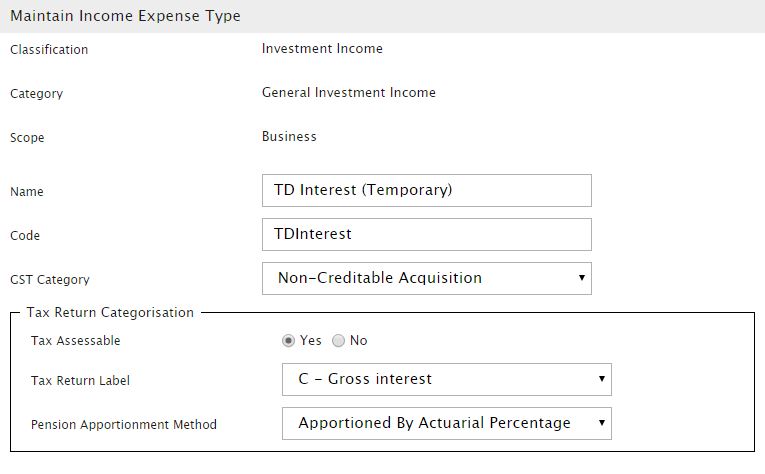
- To Add a new Investment Income account, select General Investment Income as the Category Type and click Add New Income and Expense Type.
- Enter the information as follows on the Maintain Income Expense Type screen:
Step 2:
- On the fund level menu go to Transactions > Match Transactions
- Click on the Context Menu Icon next to the unmatched cash transaction and click on Match To New > Fund Income > General investment income
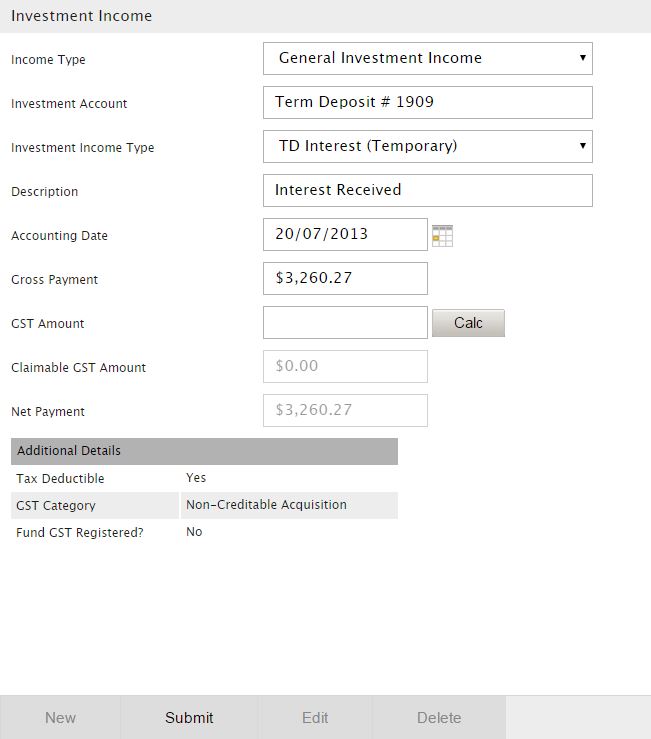
- We will now record the interest receivable amount of $3,260.27 to the Investment Income account we created in Step 1. It is important to note that Additional Details noted on the event screen is as shown below. This transaction is relevant as we would like to ensure the amount of $3,260.27 is taxed in 2014. Click Submit to process the business event.
- Back to the Match Transaction screen now. If you have done the above step correctly you should have a partially matched cash transaction, which in this case is the amount of $931.51, which is the amount that we need to record as Interest Income on the Operating Statement.

- Click on the Menu Icon next to the partially matched cash transaction and click on Match To New > Fund Income > Interest Received to process this event. Remember to select the term deposit as the Investment Account before submitting the transaction.
Step 3:
- On the business level menu go to Settings > Investment Income, select Category Type > General Investment Income. Select TD Interest (Temporary) account we had previously created in Step 1.
- Click Edit and change Tax Assessable status to No. Click Save and then Close.
- Holding onto Ctrl on your keyboard click on Class logo on the top left corner of the page to open the Browse Funds screen on a new tab.
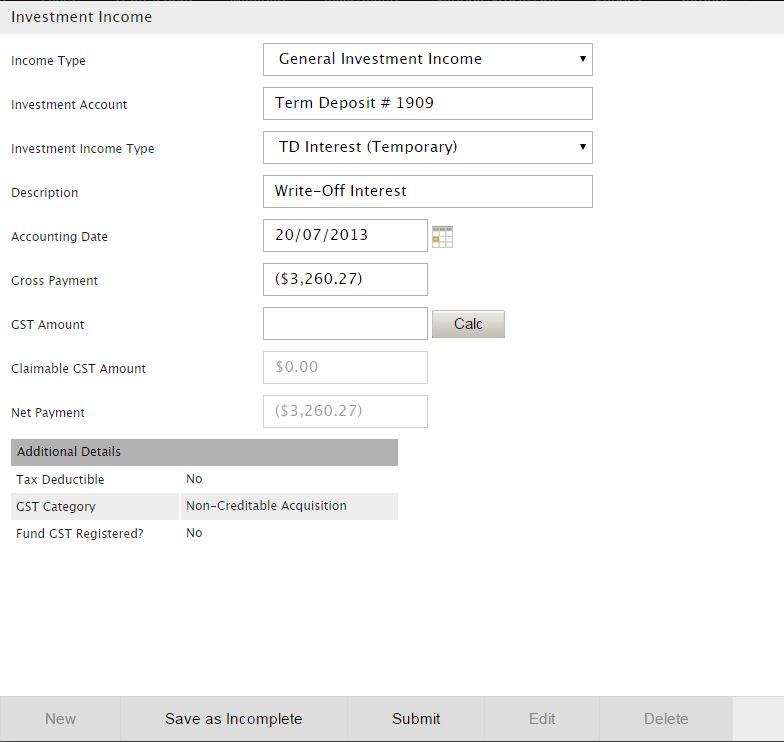
- Go to the fund then click on Transactions > Fund income > General investment income to process a negative amount of $3,260.27 to the TD Interest (Temporary) account. See below for screenshot of the event you are about to process, note the Tax Deductible status is showing as No under the Additional Details. Click Submit to continue.
- On the Match Transactions Screen, tick the Interest Receivable amount as at 30/06/2013 and Match it to the business event we just processed.

Step 4:
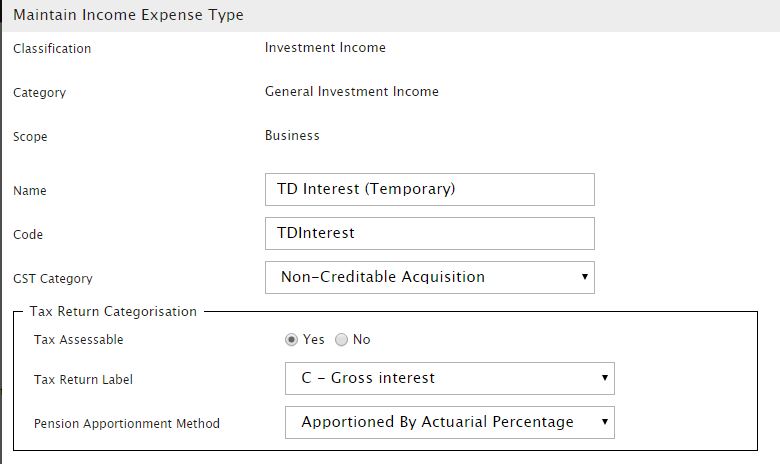
- The transaction is now processed but before we can move on and run a Period Update we need to make sure that the Tax Assessable status on the TD Interest (Temporary) account has been changed back to Yes.
- You will remember in Step 3 we had asked you to open up the Browse Funds screen on a new tab. So you should still have an open tab with the Maintain Income Expense Type screen open. Ensure you change the Tax Assessable status to Yes before moving on.
Step 5 (Final Step)
Check that the only Interest amount recorded on your Operating Statement is $931.51 and the amount recorded on the Income Tax Return is $4,191.78.