Introduction
This page shows you how best to manually load CBA transactions on to Class.
Prerequisites
Ensure the Fund is active
At the Fund level, go to the Feeds > Feeds console, open the feed account and ensure that the:
- Bank Account is active
- Code has been entered and is unique
- Cash Product Type is Bank Account
- BSB Number has been entered correctly
- Account Number has been entered correctly
- Product has been selected if not automatically assigned
- Manually Imported is selected
QIF Format
The QIF or Quicken Interchange Format is a data exchange file the is commonly used by banking websites, this file can be exported from your bank's website and imported directly into Class per the following user guide entry: QIF British Date - dd-mm-yyyy, dd-mm-yy
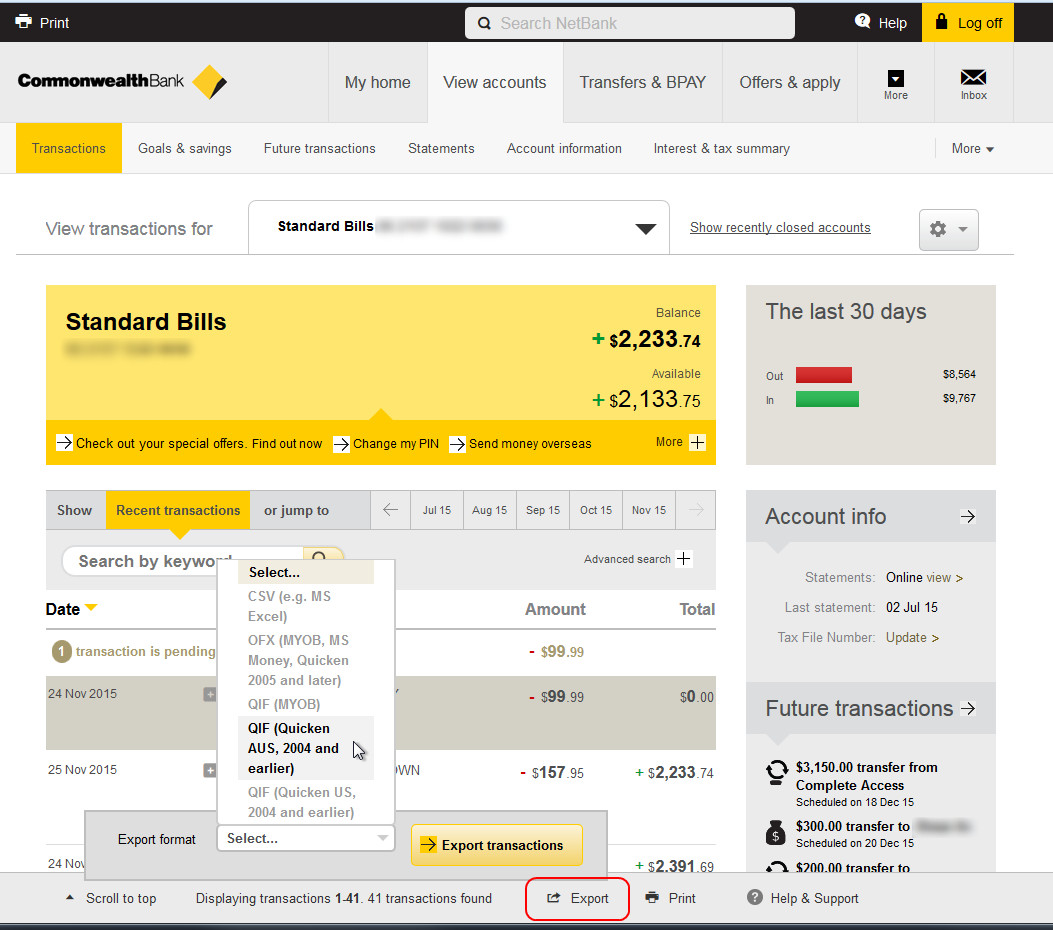
To export the QIF file from the CBA website:
Under the View accounts section, select Transactions
- Click the export button
- Select QIF (Quicken AUS, 2004 and earlier) export format.
- Click Export transactions button.
Loading the Data
This file can either be loaded at a Business or Fund level, from Transactions > Load data file.